Mcp display
Detailed information about MCP Server connections can be displayed with
/mcp status. In the terminal, /mcp remains a status shortcut and
/mcpstatus remains a compatibility alias. Use /mcp list for the configured
and attached server inventory.
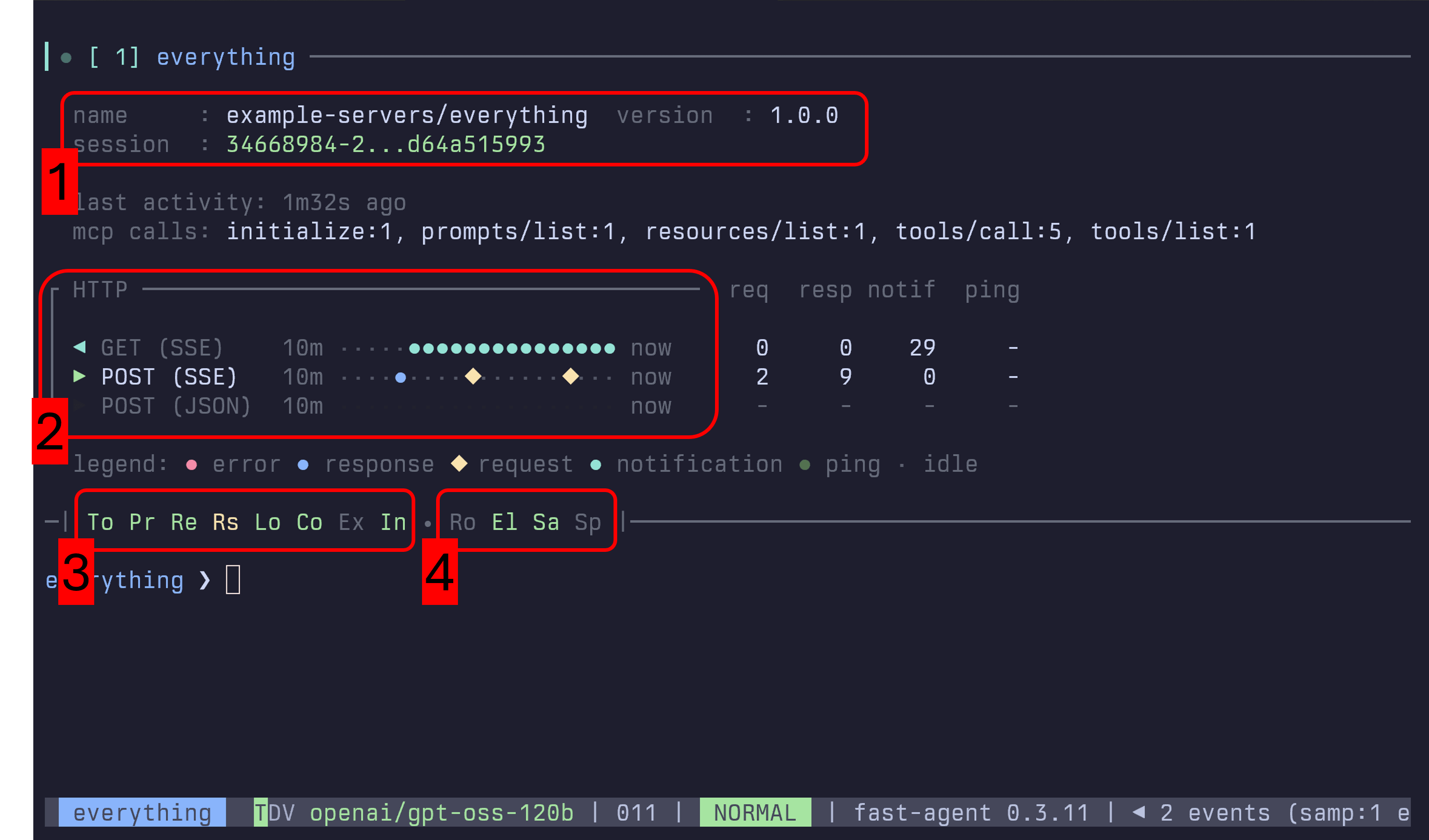
Section 1 - Implementation, Protocol, and Session
This section shows the server implementation, negotiated protocol version and
era, and subscription state. For legacy Streamable HTTP servers it also shows a
real Mcp-Session-Id when one was observed. Modern 2026-07-28 connections are
shown as sessionless. The local value for stdio describes transport locality,
not a protocol session. A configured forced mode is signposted alongside the
connection path, for example modern, adopt, forced modern or legacy,
initialize, forced legacy.
Section 2 - Transport Channel History
Shows transport activity only when fast-agent has a live diagnostics source.
The SDK v2 integration records stdio connection and operation activity. For
Streamable HTTP, public httpx hooks classify outgoing POST requests as JSON or
SSE from their Accept header, record GET status and errors, and track
resumption requests carrying Last-Event-ID. Response bodies and streamed SSE
events are not consumed for diagnostics, so the display does not infer message
counts from them.
This recording connects to Hugging Face's live stable-v2 MCP endpoint, opens
/mcp, and shows modern discovery plus public-hook HTTP diagnostics before
continuing into the Skills over MCP workflow:
Section 3 - Server Capabilities
To,Pr,Re: Tools, Prompts and Resources. Green for available, Yellow for List Change notifications.Rs: Resource Subscriptions.Lo,Co: Logging and Completions.Ex: Experimental CapabilitiesIn: Instructions. Green for available, and used - Yellow for available but not in Prompt, Red for available, but disabled.
Section 4 - Client Capabilities.
Ro: Roots offered to MCP Server.El: Elicitation offered to MCP Server. Red forCancel Allmode.Sa: Sampling offered to MCP Server. Green for auto, Yellow for manually configured.Sp: MCP Client Name has been spoofed.
Configuration
When a transport activity timeline is available, it can be tailored in
fast-agent.yaml under mcp.diagnostics.timeline:
mcp:
  diagnostics:
    enabled: true
    timeline:
      steps: 20         # number of buckets rendered on the timeline
      step_seconds: 30  # duration of each bucket (supports "45s" or "2m")
Set mcp.diagnostics.enabled to false to disable MCP diagnostics collection.
Timeline values flow through to both fast-agent check and the in-session
/mcp status display. When multiple events occur in the same bucket, higher priority
states replace lower ones using this order: error → disabled/request →
response → notification/ping → none. This keeps significant events (such
as errors and requests) visible even if a subsequent ping lands in the same
interval.